¶ Searching Enrolled Accounts
This page is for Payment Service Provider staff only.
You reach this screen by signing in with a PSP user account. You see only accounts held with your own organisation.
¶ Overview
The Enrolled Accounts page lets you look up the beneficiary accounts your organisation holds. It is the quickest way to answer a question about a single household or account without opening a payroll or verification list.
This lesson teaches you how to search enrolled accounts and how to use what you find.
¶ Purpose
Questions arrive constantly at a branch or call centre — a beneficiary asks whether their account is registered, a colleague needs to confirm an account number, a query comes in about a payment.
This page answers them directly. It is read-only, so nothing can be changed by accident.
¶ Who Can Perform This Process
| Task | Permission required |
|---|---|
| Sign in to the PSP Portal | Access to the PSP API |
| Search enrolled accounts | Fetch enrolled accounts |
This permission comes with the PSP Administrator role.
¶ Before You Begin
- You need a PSP user account linked to your organisation.
- Have something to search with — an account number, a household code, or a name.
- Accounts appear here only once they have been recorded against your organisation through a KYC request.
¶ Navigation
Sign in to the SCTP MIS with your PSP user account
→ Enrolled Accounts
¶ Step-by-Step Guide
¶ Part 1 — Opening the page
-
Sign in to the SCTP MIS with your PSP user account. You are taken to the PSP Portal.
-
Click Enrolled Accounts.

Screenshot: PSP Portal menu with Enrolled Accounts highlighted.
-
The Enrolled Accounts page opens, listing the beneficiary accounts held with your organisation.
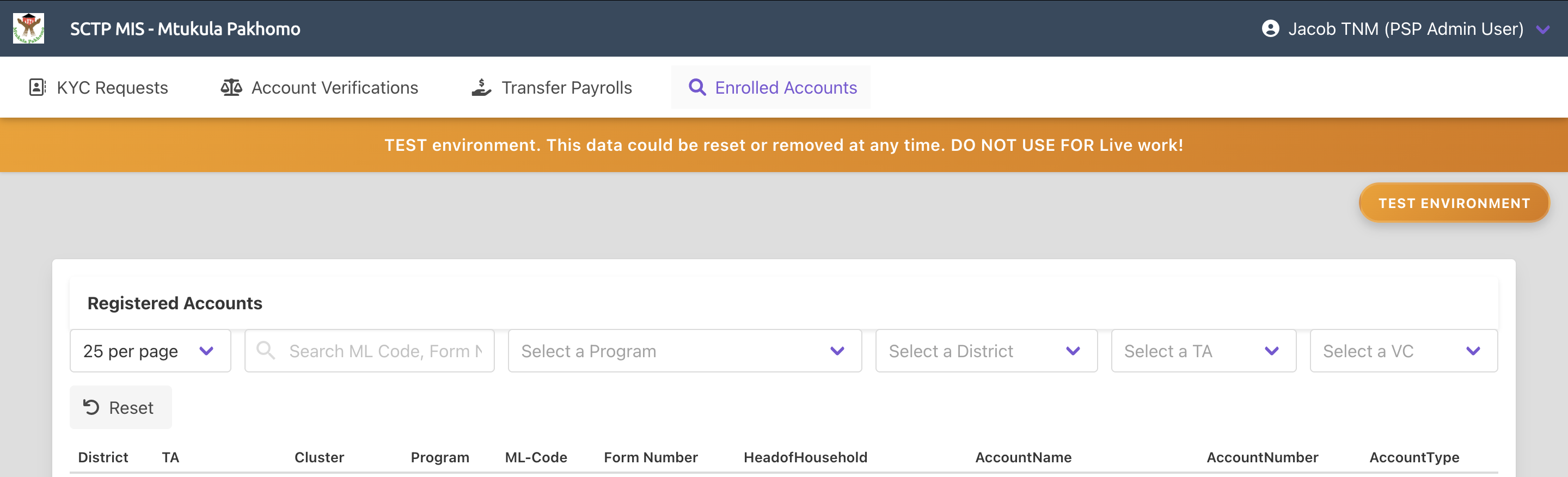
Screenshot: Enrolled accounts list in the PSP Portal.
-
You see only your own organisation's accounts. Accounts held with other providers are never visible to you.
¶ Part 2 — Searching for an account
-
Click inside the search box.
-
Type what you know — the account number, the household code, or a name.
-
Start the search.
-
The results, the list narrows to matching accounts.
-
If nothing is found, try a different piece of information. An account number is more reliable than a name, because names are recorded as given at enrolment and may be spelled differently from how they are reported to you.
¶ Part 3 — Adjusting the display
-
Change the number of accounts shown per page.
You can display between 1 and 300 accounts at a time. Twenty-five are shown by default.
-
Move between pages using the page controls.
-
Note the total number of accounts shown, so you know how much of the list you are looking at.
¶ Part 4 — Using what you find
-
Use the result to answer the question in front of you.
Question What to check Is this beneficiary registered with us? Whether the account appears at all Is this the right account number? The account number against the household Whose account is this? The account name and the household it belongs to Why has this household not been paid? Whether an account exists — a household with none is excluded from the payroll -
If the account is not found, the household may have no account recorded with your organisation. It will be excluded from payment until one is supplied through a KYC request.
-
If the account details are wrong, do not attempt to correct them here. This page is read-only.
Tell the programme, so they can raise a KYC update request — see Responding to KYC Requests.
-
If a beneficiary is querying a payment rather than an account, check the payroll for the relevant period instead — see Working with Transfer Payrolls and Disbursement Reports.
¶ Required Information
| Field | Description | Required |
|---|---|---|
| Search | Account number, household code or name | No |
| Page size | Number of accounts shown per page, between 1 and 300. Twenty-five by default | No |
¶ Validation Rules
- Page number must be at least 1.
- Page size must be between 1 and 300.
- You see only accounts held with your own organisation. This is enforced by the system and cannot be changed.
- The page is read-only. Account details cannot be corrected here.
¶ What Happens Next
When you search
- Matching accounts held with your organisation are listed, with the total number of matches.
- Nothing changes in the system. Searching is read-only.
How accounts get here
| Step | What happens |
|---|---|
| The programme raises a KYC request | Your organisation is asked for account details |
| You upload the details | The records are staged |
| The programme approves them | The accounts are applied to the households and appear here |
How to change an account
Corrections are made through a KYC update request raised by the programme, not on this page. Contact the programme with the details that need correcting.
¶ Common Errors
| Message or situation | What it means and what to do |
|---|---|
| No accounts are found | The search text may be wrong, or the household has no account with your organisation |
| A beneficiary is not listed at all | Their account has not been supplied or approved yet. Contact the programme |
| The name does not match what the beneficiary told you | Names are recorded as given at enrolment. Search by account number instead |
| The account number is wrong | Tell the programme so they can raise a KYC update request. It cannot be corrected here |
| The list is empty | No accounts have been approved for your organisation yet |
| The Enrolled Accounts menu is missing | Your PSP user profile may be inactive or missing the required permission |
| You see another organisation's accounts | Report this to the programme immediately. It should not be possible |
| The page will not load | The page size may be outside the allowed range. Reduce it and try again |
¶ Tips
- Search by account number wherever possible. It is unique and avoids the problems that names cause.
- Ask the beneficiary for their passbook. It carries the household codes that make a search reliable.
- Use this page before opening a payroll. For a simple "am I registered?" question it is far quicker.
- A missing account explains a missing payment. A household with no account here is excluded from the payroll.
- Do not promise corrections you cannot make. This page is read-only, and changes go through the programme.
- Report wrong details promptly. A wrong account number means a payment that fails or reaches the wrong person.
- Increase the page size when you need to scan a whole area rather than find one household.
¶ Related Processes
- Responding to KYC Requests — how accounts are supplied and corrected
- Completing Account Verifications — how accounts are confirmed before payment
- Working with Transfer Payrolls and Disbursement Reports — for questions about a specific payment
- Capturing and Updating KYC and Account Numbers — the programme-side view of account management